dbt
Once the raw data lands in Supabase, the real work starts.
dbt is where business knowledge becomes code, every filter, every threshold, every definition of what counts as a valid sale is written here. That's why domain expertise matters as much as technical skill at this stage: you can't write the right business rules if you don't understand the business.
The choice of dbt over plain SQL scripts or Python comes down to maintainability and scalability. Business rules change. A season boundary shifts, a threshold gets recalibrated, a new edge case appears after a few months in production. With dbt, that fix happens in one place, gets tested, and flows through the entire transformation chain automatically. Every model is a versioned SQL file, every dependency is explicit, and the full pipeline can be rebuilt from scratch in a single command.
The other reason is trust. The raw layer is intentionally kept untouched, if a filter turns out to be wrong or a threshold needs adjustment, the original data is always there. Nothing is lost. All transformation decisions live in dbt, which means there is always a clear answer to the question: where does this number come from?
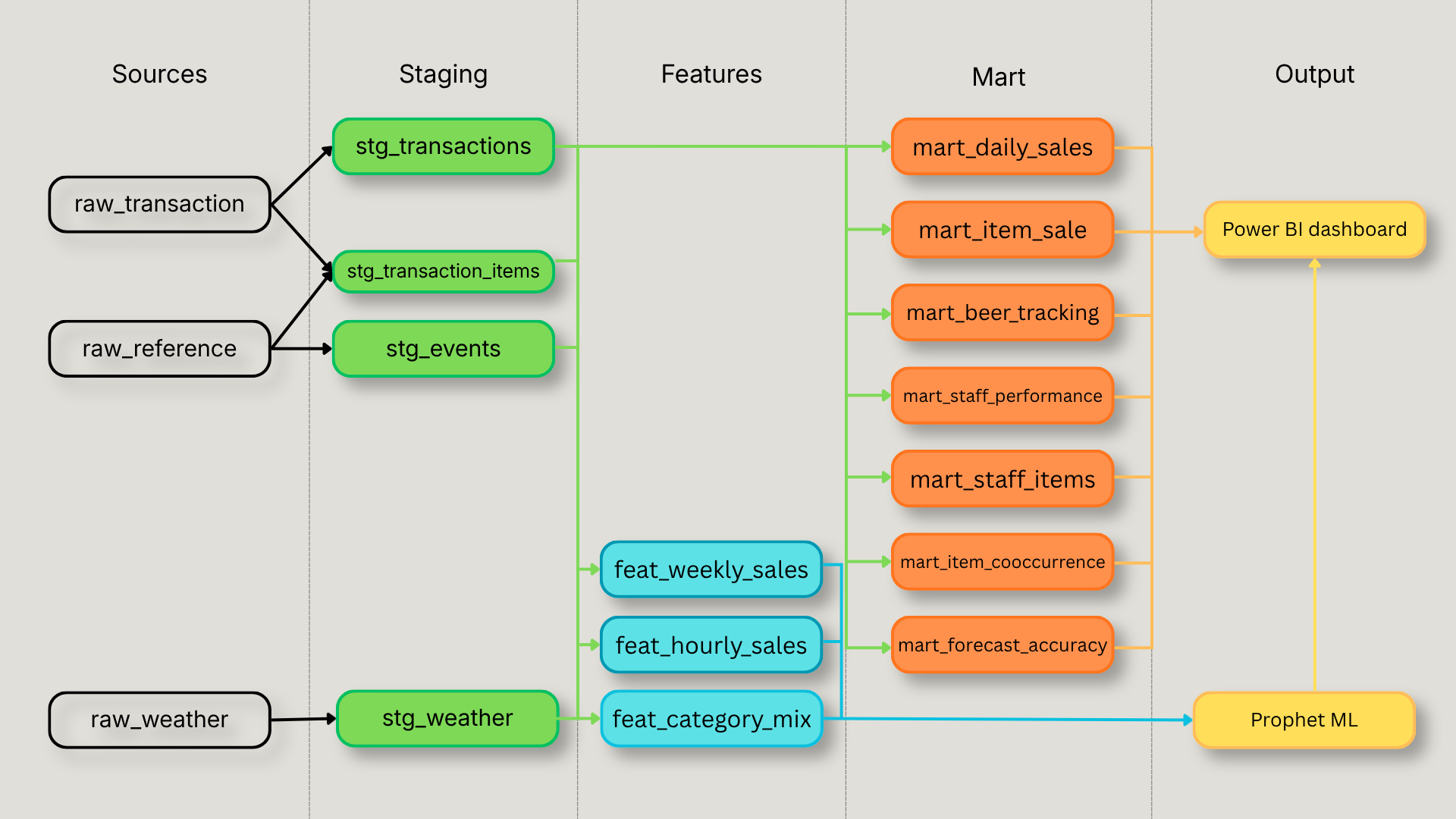
The dbt DAG — five layers, one output
The transformation pipeline flows in one direction and never loops back. Raw data enters through three source schemas and passes through four transformation layers before reaching the outputs.
The staging layer cleans and standardizes, types are cast, joins are resolved, and derived fields like transaction_hour and iso_day_of_week are computed once here so no downstream model has to repeat that logic.
The feature layer and mart layer are parallel consumers of staging. Features aggregate data into the exact shape Prophet needs weekly revenue, hourly distributions, category mix. Mart tables aggregate data into the exact shape Power BI needs, one table per dashboard use case. Neither layer knows about the other, except for mart_forecast_accuracy which bridges both: it joins actuals from feat_weekly_sales with Prophet's predictions to power the model accuracy page.
The outputs are Prophet and Power BI. Prophet reads exclusively from the feature layer. Power BI reads exclusively from the mart layer and from Prophet's forecast tables.
One key goal of this architecture is to minimize dependencies between layers and maximize scalability, adding a new dashboard page means adding one mart model, adding a new forecast means adding one feature model. Nothing else needs to change.
Staging — cleaning and standardizing the raw layer
The staging layer has one job: take raw data and make it consistent. No business rules, no filtering, no aggregation, just clean, typed, joined views that every downstream model can trust.
stg_transactions is the most complex model in this layer. It joins transactions with their financial totals, resolves payment methods, when a bill is split across two payment types, only the primary one (highest amount) is kept, and extracts all time components once: transaction hour, day of week, ISO week. Every downstream model that needs to know whether a transaction happened on a Friday at 8pm gets that information from here, never recomputes it.
stg_transaction_items joins item lines with the item and category reference tables using an inner join. That join has an important side effect: lines without a matching category, staff comments, internal notes, non-menu entries are naturally excluded from the clean layer. This is one of the most significant differences between raw and clean data. A dashboard built on unfiltered item lines would include noise that distorts every metric it touches. At the same time, those lines are preserved in the raw layer for any future analysis that might need them.
stg_weather merges historical and forecast weather into a single view. Because the forecast table appends on every pipeline run, duplicate rows accumulate for the same date. The deduplication rule is simple: historical always beats forecast, and among duplicate forecast rows, the most recently inserted one wins.
stg_events is the simplest model but carries an important detail: the two Facebook attendance signals, event_went and event_interested, are kept as separate columns rather than combined. That decision belongs to the feature layer, not here.
Features, where business knowledge becomes business logic
The feature layer is where the restaurant's operational reality gets encoded into data. These three models exist for one purpose: feeding Prophet with the right inputs. Every business rule that matters for forecasting is applied here.
feat_weekly_sales is the most important model in the project. It aggregates revenue to the ISO week grain, applies the open day threshold (minimum 5 transactions to count as a real operating day), and excludes group bookings from the revenue signal. Group reservations behave fundamentally differently from regular service, they inflate weekly totals in ways that would skew the forecast baseline. The exclusion threshold ($242 total and more than 10 line items) was not arbitrary: it was derived by analyzing the distribution of transaction sizes, using median price as the reference point and identifying natural outliers that clearly separated regular table service from event-style bookings.
Season boundaries are assigned using data-driven logic, not hardcoded dates. The season start and end are derived from the actual first and last open days each year, which means the model adapts automatically as the restaurant's operating calendar shifts. Weather and event regressors are joined here, giving Prophet the full context it needs to forecast each week.
One decision worth highlighting: gift cards and deposits are intentionally kept in the revenue signal. Removing them was tested and actually made the model worse, winter MAPE increased from 46.6% to 50.4% because Prophet's baseline had been trained on totals that include them. The data made the decision.
feat_hourly_sales builds the hourly distribution profile used for the heatmap. The grain is season + month + day of week + hour, month is included specifically to capture the sunset effect discovered in the data: peak service hour shifts from 18h in winter to 19h in summer, with September Saturdays peaking at 42% of revenue at 19h. Aggregating by season alone would smooth over that shift and produce a less accurate distribution. Median is used as the primary signal rather than average, more robust for staffing decisions and resistant to event outliers that inflate a single week.
feat_category_mix computes each category's share of weekly revenue and quantity. The output is a percentage, not an absolute value, which means the model captures the relative mix between food and drinks regardless of how busy a given week was.
Mart, one table, one use case
The mart layer has a simple rule: every table maps to exactly one dashboard use case. No transformation happens in Power BI — if a number appears on the dashboard, it was computed in dbt.
mart_daily_salespowers the sales tracking page, hourly revenue and transaction counts by date, used for the weekly bar chart and the hourly heatmap showing when the restaurant is busiest.
mart_item_sales powers item-level analysis, weekly sales by item and category, used for the top sellers ranking, category revenue breakdown, and item drill-down.
mart_beer_tracking tracks draft beer volume by tap, format, and week. Volume is computed in litres from Quebec standard format sizes (pinte = 568ml, verre = 473ml, pichet = 1775ml), giving the manager a precise weekly volume signal rather than a unit count.
mart_staff_performance powers the server performance page, revenue, category mix, and estimated service hours per server per week. Service hours are estimated from the gap between first and last transaction of the day, capped at 14 hours, with a minimum of 5 transactions to count as a valid shift. This captures the actual time a server was actively on the floor taking orders, a meaningful operational metric that doesn't exist anywhere in the raw data.
mart_staff_items supports the item search feature on the staff page, which server sold the most of a specific item, filterable by category then item in a two-level selector.
mart_item_cooccurrence is the market basket analysis table, every pair of items that appeared on the same bill, with a minimum of 10 co-occurrences to filter out noise. Powers the "what else gets ordered with this item" panel on the category page.
mart_forecast_accuracy is the bridge between the forecasting pipeline and the dashboard. It joins actual revenue from feat_weekly_sales with Prophet's predictions and computes error metrics, MAPE, dollar error, above/below, for the model accuracy page. Backfill predictions take precedence over live history for overlapping weeks.
Design decisions
Data-driven season boundaries over hardcoded dates Rather than defining summer as May 1 to October 31, season boundaries are derived from the actual first and last open days each year. This means the model adapts automatically when the restaurant opens a week late or closes a week early, no manual update required, no edge case where a real operating day falls outside the season definition.
Gift cards kept in revenue Gift cards and deposits are kept in the revenue signal rather than excluded. This was tested: removing them increased winter MAPE from 46.6% to 50.4%. The raw layer preserves all transactions regardless, so the decision can be revisited at any time without losing data.
Median over average for hourly distribution The hourly feature table uses median revenue as its primary signal rather than average. A single event night can inflate the average for a given hour slot significantly. Median is more robust for staffing decisions, it reflects what a typical service looks like, not what an exceptional one looks like.
No transformation in Power BI Every metric on the dashboard is computed in dbt. Power BI reads mart tables directly and applies no business logic of its own. This keeps the transformation layer the single source of truth and makes any future BI tool migration straightforward. There was also a practical reason: the primary stakeholder, the service manager who uses the dashboard weekly, flagged early on that a slow dashboard simply would not get used. Keeping all heavy computation in dbt and serving pre-aggregated mart tables to Power BI keeps the dashboard fast and the adoption barrier low.
Known limitations
No reliable customer count The POS data technically contains seat information, but in practice servers tend to punch all items under the same seat, making the customer count effectively always equal to one. A proxy could be derived for specific analyses, average items per transaction, for example, but no proxy was considered accurate enough for a general dashboard where a misleading number is worse than no number at all.
Check close time, not order time Transaction timestamps reflect when the check was last printed, not when the first item was entered. This means the data captures when a table closed, not when guests arrived or how long they stayed. True service hours and table turn time cannot be measured from this data.
Server attribution on transferred checks When a server transfers a table to a colleague before closing the check, the transaction is recorded under the last server to handle it. There is no transfer event in the data. Server-level sales figures are therefore accurate for the majority of service but cannot account for table transfers, a known limitation of how the POS records ownership.
The feature layer feeds directly into the Prophet forecasting models — the business rules applied here have a direct impact on forecast accuracy. The next section covers the forecasting approach in detail, including specific decisions made at the feature level such as the exclusion of summer 2023 from the training data.
Full script breakdown and design decisions on GitHub