ELT PIPELINE
Python · PostgreSQL · Supabase · dbt ·GitHub Actions · PDF Parsing
From a restaurant printer to a cloud database, every week, automatically.
Never take for granted that you'll walk into a project with a clean database or a working API. This one started with nothing, no database, no API, not even a CSV file. The POS system at the restaurant, Veloce, had no export feature whatsoever. The only way to get data out was through print reports. That's where the pipeline begins.
Starting from scratch turned out to be an opportunity: with no existing architecture to work around, I could build a clean ELT pipeline from the ground up rather than inheriting someone else's ETL mess. The logic is simple, export the print files as .PRN, convert them to PDF, and parse them with a suite of custom Python scripts. To keep the full process accessible for my stakeholder (the restaurant manager), everything runs through a single batch file.
Full script breakdown and design decisions on GitHub
ARCHITECTURE OVERVIEW
One batch file, fully automated from there
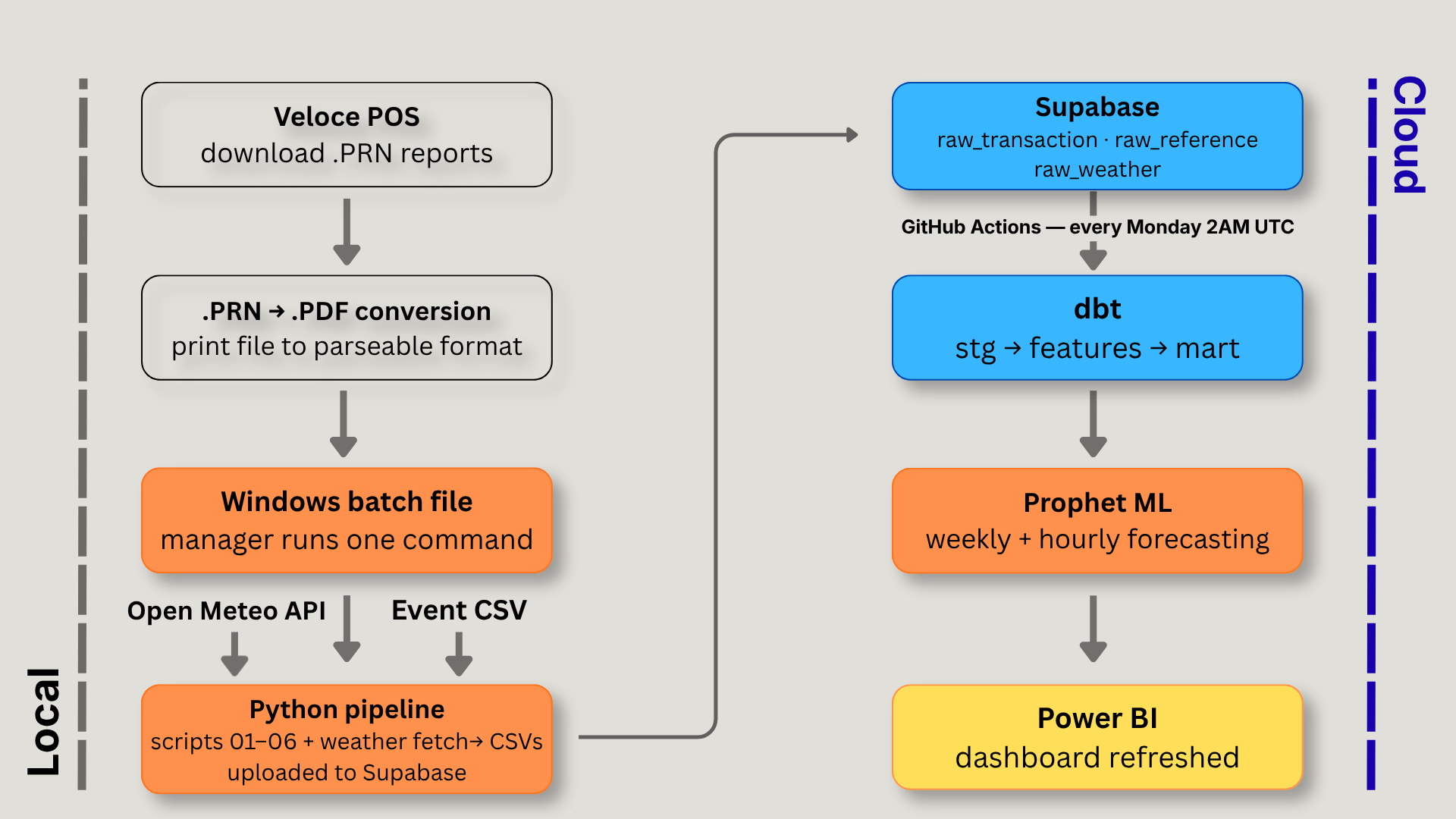
The pipeline is designed around a non-technical user. The restaurant manager downloads the weekly reports from Veloce, places them in a designated folder, and runs a single Windows batch file. That triggers the master runner, six extraction scripts in sequence, weather fetch, and upload to Supabase. A GitHub Actions workflow picks up from there, running dbt transformations and the Prophet forecasting models every Monday at 2AM UTC.
The reports stay local by choice, the manager preferred not to send raw restaurant data to the cloud. Everything that can run remotely does. The next version of the pipeline will chain directly into GitHub Actions at the end of the local run, making the full process a single click.
EXTRACTION
The two report types
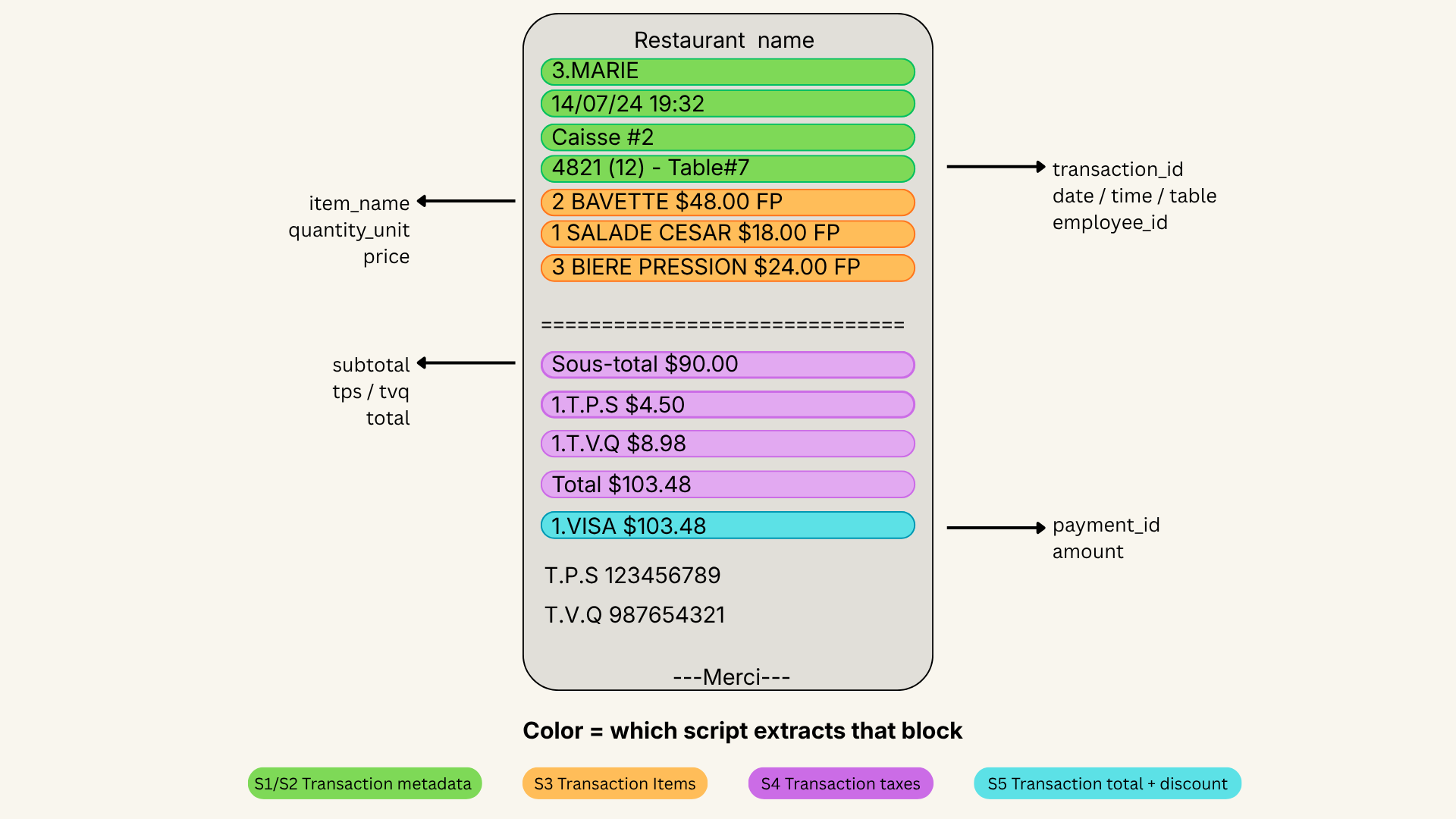
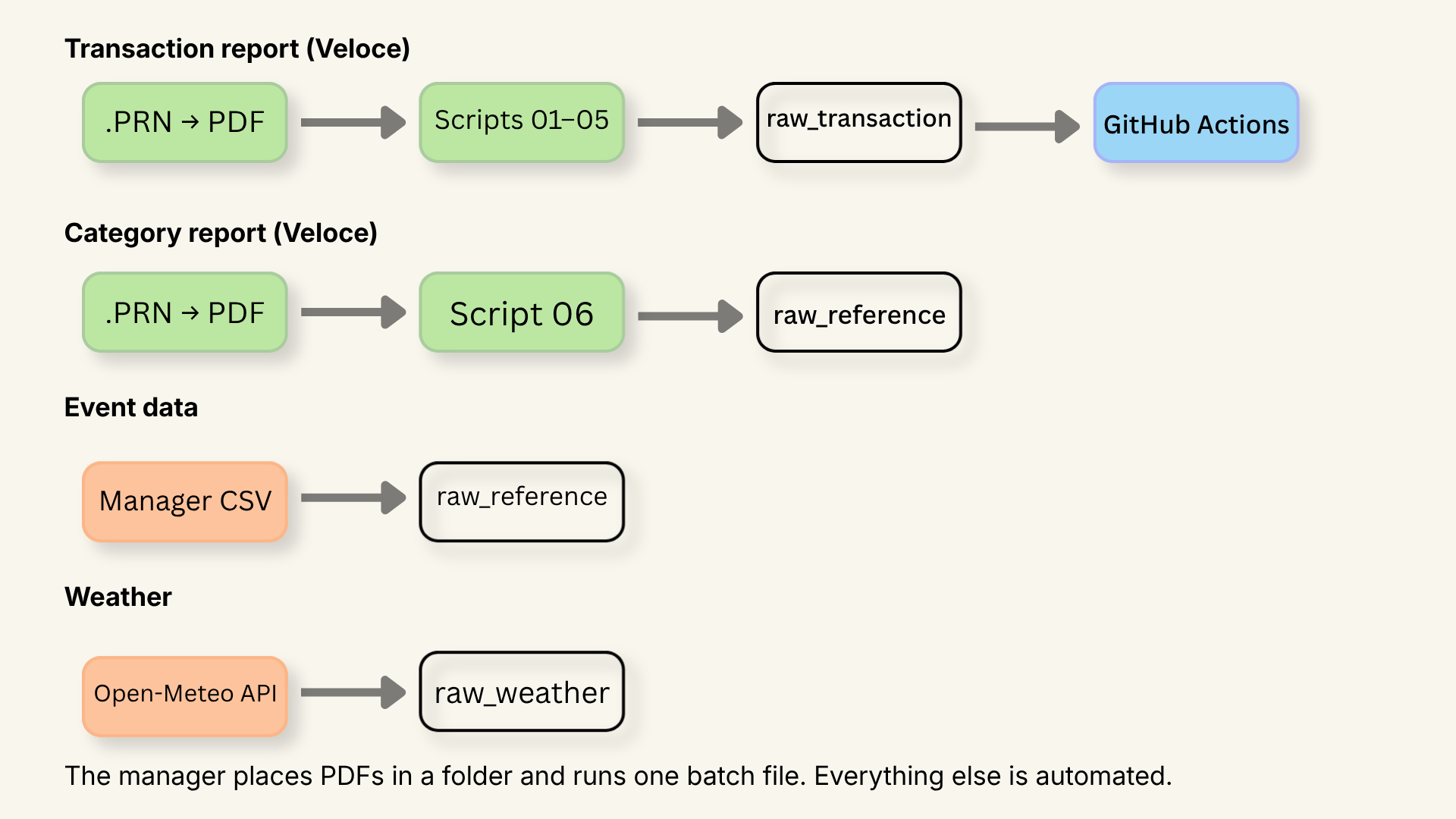
Veloce generates two structurally different reports, and they each need their own parsing approach. The transaction report is a chronological list of every finalized check of the night, that's the one the annotated receipt above comes from, handled by scripts 01 through 05. The second is a category sales report: a summary of everything sold, organized by item category. It lives in a separate folder, has a completely different layout, and is handled exclusively by script 06.
One receipt, five scripts, one clean schema
Each script extracts a different slice of the same receipt and feeds a different table in the database. Script 01 builds the reference lookups, items and employees. Script 02 captures the transaction header. Script 03 records what was ordered. Script 04 extracts the totals. Script 05 handles payments. The dependency chain is managed automatically, the manager never has to think about it.
Linking items to their category — no manual work
The transaction report contains everything about a sale except one thing: which category each item belongs to. Entering that manually for every menu item wasn't an option. Instead, I used a second Veloce report, the global sales by category, which groups every item under its category. A second script reads that report and automatically matches item names to the ones already extracted, assigning each one a category ID.
External data sources — weather and events
Two additional sources feed the pipeline alongside the POS data. Weather comes from the Open-Meteo API, historical records and a 7-day forecast, fetched automatically on every run. Event data comes from a spreadsheet maintained by the manager: shows, meetings, and private bookings with dates and estimated attendance, exported as a CSV before each run. Facebook events are the most consistent source for historical attendance figures, regressor weighting and noise handling are covered in the Prophet section.
What gets skipped and why
Every script tracks which transaction IDs it has already processed, either in memory during a run or via the existing CSV on disk. If a PDF has already been parsed, its transactions are silently skipped. This means re-running the pipeline on the same files is always safe, no duplicates, no crashes, just a clean skip with a count in the logs.
LOAD
From CSV to Supabase — the load strategy
Once extraction is done, script 09 handles the upload to Supabase. Not all tables are loaded the same way, each type has its own strategy to make sure re-running the pipeline never corrupts the data.
Loading raw, unmodified data into Supabase before any transformation is a deliberate choice, it preserves the source of truth and means every business rule decision happens in one place, in dbt, where it can be versioned and tested.
Reference tables like items, employees, and categories use INSERT ... ON CONFLICT DO NOTHING, if a row already exists, it's simply skipped. Transaction tables are appended in full, then the CSV is moved to a dated archive folder, its absence on the next run prevents any double-load. Weather has its own lightweight tracking file that remembers the last date loaded, so only new rows are ever inserted.
The result is a pipeline that's safe to re-run at any time, with no duplicates and no manual cleanup.
SQL STRUCTURE
The raw layer is organized into three schemas raw_transaction, raw_reference, and raw_weather each with a single responsibility. Together they hold everything the pipeline collects, untouched, before any transformation happens. The transformation schemas stg, features, forecast, and mart are covered in detail in the dbt and Prophet sections. The full table structure is available below for those who want to dig in.
DESIGN DECISION
Keeping everything — a deliberate choice
One decision that runs through the entire pipeline is to never throw data away at the raw layer. Hotel transactions, gift card payments, forecast weather from previous weeks, register numbers, rounding adjustments, all of it lands in Supabase untouched. Some of it gets filtered out during transformation for specific use cases, but the raw layer stays complete. Data that seems irrelevant today might answer a question we haven't thought of yet.
A few examples of that thinking in practice: the register number (caisse) captures where a server was physically working that night, potentially useful for understanding how weather affects different parts of the restaurant. The Facebook attendance signals (event_went vs event_interested) are both stored because it wasn't obvious upfront which one would be more predictive. The rounding adjustment (arrondissement) is preserved so any revenue calculation can match the exact total printed on the check. None of these are used in every model, but they're there when needed.
One pipeline, one command
The extraction layer is split into six independent scripts, but the manager only ever runs one thing, the master pipeline. If something breaks, the console output points exactly to which script failed. And because every script is built to be safely re-run, no duplicate rows, no data corruption, fixing the issue and running the pipeline again is all it takes to recover.
What I learned in production
Running a real pipeline on real data surfaces problems you'd never anticipate upfront. Two are already on the roadmap.
The first is about completeness. The initial version of the pipeline only kept items sold, modifier lines attached to a server or a note were silently dropped. In practice those lines carry useful contextual information: upsells, special requests, service patterns. A future version will capture all line items rather than filtering at extraction time.
The second is a data integrity problem that originates in the POS system itself. Veloce doesn't version employee records, when a new server joins, their name simply overwrites the previous one on the same ID. The fix is straightforward: a manually maintained CSV, similar to the event data approach already used in the pipeline, where the manager records each server's name and their active dates. Simple, sustainable, and consistent with how the rest of the pipeline handles data that doesn't live in a system.
Full script breakdown and design decisions on GitHub